
Bring the open roles already sitting on your active projects into your new department-based reporting.
Overview
Attaching a department to a role only shapes open roles you add from that point forward. Any open role already sitting on a project keeps whatever department it had when it was created, which for most existing accounts is none. This workflow walks through updating those existing open roles so department grouping and reporting reflect your whole portfolio, not just new work.
When to use this
You have just tagged your roles with departments and want your existing projects to reflect it.
Your department-grouped view in the Role Demand Report shows a large No Department group that you want to clear out.
You are onboarding a new department structure partway through a project's life.
Before you start
Tag your roles with departments first. Every role you plan to assign by department needs its department attached in Standards before you start reassigning open roles on projects. 👉 Roles and Departments
Steps
Open Planner and go to the first project you want to update.
Find the project's open roles. Any that predate your department setup show with no department attached.
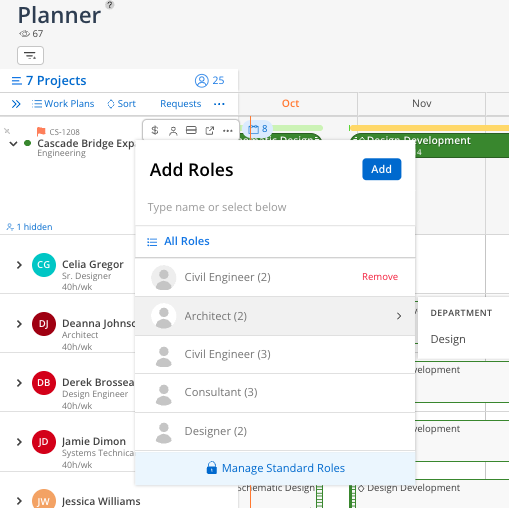
Select an open role and modify it to the departmental version of that role you want it to carry.
Save the change, then repeat for each remaining open role on the project.
Move to the next project and repeat the process until your active portfolio is covered.
Tips
Start with your highest-activity projects. You do not need to update every project in one sitting. Clearing department tags on your most active work first gets your reporting accurate where it matters soonest.
Expect more roles than you actively use. Because ERP integrations sync in every role from your rate tables, your role list can run well beyond what your team staffs day to day. Focus this cleanup on the roles that actually show up as open roles on your projects, not your full role list.
This is a one-time pass per project. Once a project's open roles carry the correct departments, new open roles you add there already default to the department you select.