---
title: "Project Schedule Export"
description: "Download a project's schedule — its phases, subphases, milestones and work categories"
url: https://support.mosaicapp.com/en/articles/760-project-schedule-export
collection: "Admin Hub - Data Export"
updated: 2026-08-12
language: en
---

# Project Schedule Export

Download a project's schedule — its phases, subphases, milestones and work categories

## **Where to export from**

On the **Project Schedule** modal, click the **three-dot menu**, select **Download**, and choose a format. This is the same three-dot export control used in the Budget and Members modals, so the action sits in the same place wherever you are exporting from.
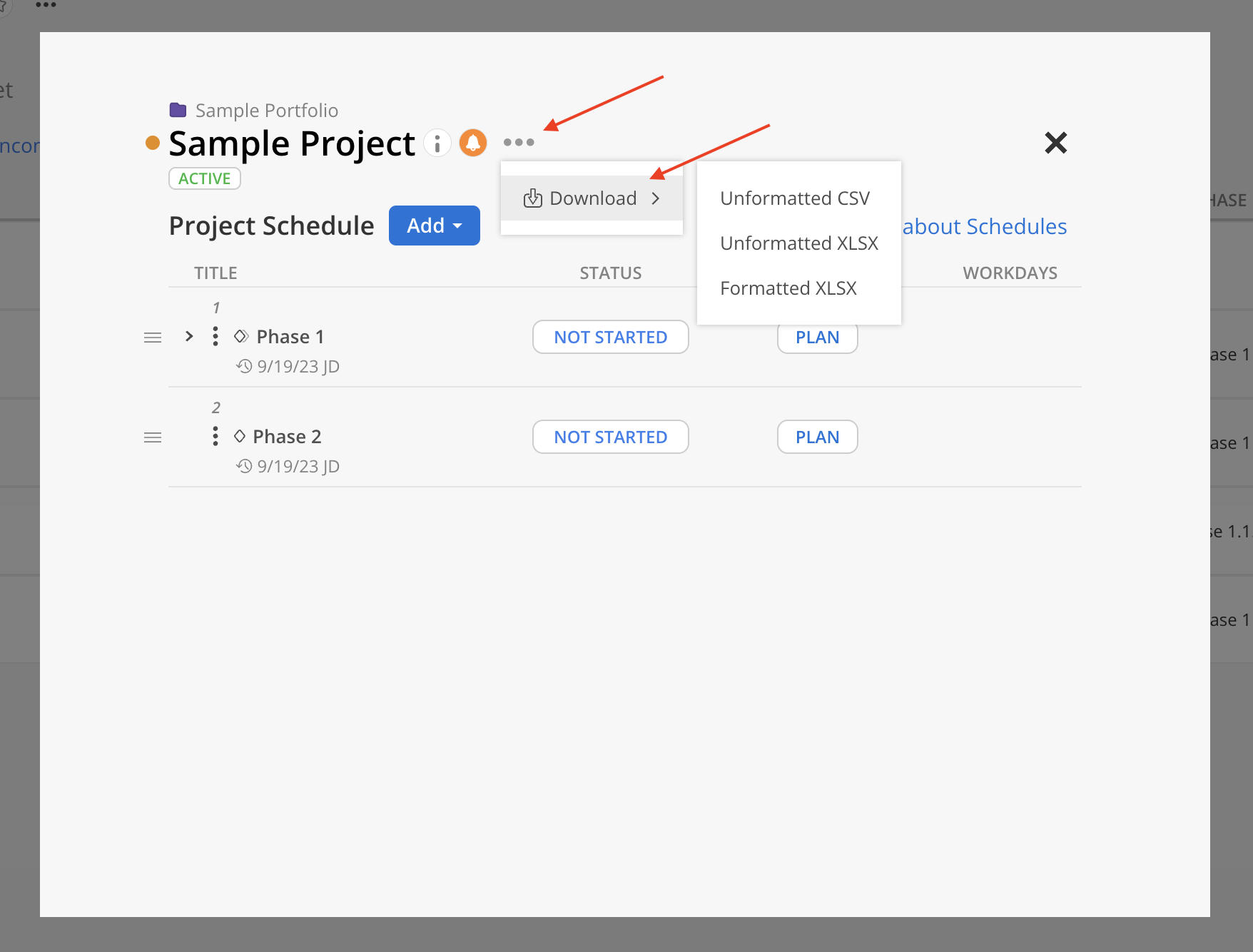
![](https://staticfiles.gleap.io/ghelparticle/wsDXrEZ3yMBc1e2YmPAAZlFpUPLmaT620KZnNUWTvoAVIniQfdlYxGPxMiVVjWQeakvaGISO0bn.png)

## **Choosing a format**

The three formats hold the same information in two different shapes.

-   **Unformatted CSV** — one flat table, as comma-separated text. Choose this when the file is feeding another system.
    
-   **Unformatted XLSX** — the same flat table as an Excel workbook, ready to sort, filter or pivot.
    
-   **Formatted XLSX** — an Excel workbook laid out as a report, one block per project. Choose this when someone is going to read the file rather than process it.
    

## **What's in the file**

The export is one row per schedule item. The **Row Type** column tells you what each row is:

**Row Type**

**What it is**

<table data-id="ae1a3f82-83ff-4f08-ad3d-02d4a8ffda5e" style="min-width: 50px;"><colgroup><col style="min-width: 25px;"><col style="min-width: 25px;"></colgroup><tbody><tr><td colspan="1" rowspan="1" style="padding: 6px 8px; border-radius: 3px; text-align: left; vertical-align: top; background: none 0% 0% / auto repeat scroll border-box border-box rgba(0, 0, 0, 0.04);"><p data-id="bb969ea4-800e-4747-b880-15c845fab645">Project</p></td><td colspan="1" rowspan="1" style="padding: 6px 8px; border-radius: 3px; text-align: left; vertical-align: top; background: none 0% 0% / auto repeat scroll border-box border-box rgba(0, 0, 0, 0.04);"><p data-id="fd4c3cbf-0929-4ecd-baf3-08ed92da7f85">The project itself</p></td></tr><tr><td colspan="1" rowspan="1" style="padding: 6px 8px; border-radius: 3px; text-align: left; vertical-align: top; background: none 0% 0% / auto repeat scroll border-box border-box rgba(0, 0, 0, 0.04);"><p data-id="5c99d722-4938-4c6a-864d-11a3db3c0149">Phase</p></td><td colspan="1" rowspan="1" style="padding: 6px 8px; border-radius: 3px; text-align: left; vertical-align: top; background: none 0% 0% / auto repeat scroll border-box border-box rgba(0, 0, 0, 0.04);"><p data-id="1dea5810-fee8-44e6-b03f-8bf3fccbfe06">A phase, including any subphase</p></td></tr><tr><td colspan="1" rowspan="1" style="padding: 6px 8px; border-radius: 3px; text-align: left; vertical-align: top; background: none 0% 0% / auto repeat scroll border-box border-box rgba(0, 0, 0, 0.04);"><p data-id="3cdee142-113d-4483-bc50-0f526f000a69">Milestone</p></td><td colspan="1" rowspan="1" style="padding: 6px 8px; border-radius: 3px; text-align: left; vertical-align: top; background: none 0% 0% / auto repeat scroll border-box border-box rgba(0, 0, 0, 0.04);"><p data-id="c9d30458-8f15-41d0-81a2-48493a95bccd">A milestone</p></td></tr><tr><td colspan="1" rowspan="1" style="padding: 6px 8px; border-radius: 3px; text-align: left; vertical-align: top; background: none 0% 0% / auto repeat scroll border-box border-box rgba(0, 0, 0, 0.04);"><p data-id="5cc0dd0a-3675-4e1e-b5d2-790c7ad551a5">Work Category</p></td><td colspan="1" rowspan="1" style="padding: 6px 8px; border-radius: 3px; text-align: left; vertical-align: top; background: none 0% 0% / auto repeat scroll border-box border-box rgba(0, 0, 0, 0.04);"><p data-id="57443eb6-f4f2-46ac-b4c6-33a2181cab05">A work category on a phase</p></td></tr></tbody></table>

Milestones get their own row type because in Mosaic a milestone is a kind of phase — separating them keeps a milestone's single date from being read as a phase's date range.

Columns that do not apply to a row are left blank: a Milestone row has no phase start and end dates, a Phase row has no work category, and so on.

### **The unformatted formats — one flat table**

**Unformatted CSV** and **Unformatted XLSX** share an identical layout of 43 columns, in six groups:

-   **Project** (6) — Portfolio, Project, Project Ref#, Project Client, Project Status, Project Billable. These repeat on every row.
    
-   **Phase** (9) — Phase, Phase Ref#, Phase Client, Phase Status, Phase Billable, Phase Start Date, Phase End Date, Phase Work Days, Phase Baseline Work Days.
    
-   **Milestone** (3) — Milestone, Milestone Status, Milestone Date.
    
-   **Work Category** (6) — Work Category, Work Category Ref#, Work Category Status, Work Category Billable, Work Category Start Date, Work Category End Date.
    
-   **Row Type** (1) — see the table above.
    
-   **Subphase** (18) — Subphase 1 through Subphase 9, each paired with a Subphase Ref#.
    

Every column is present in every export even when it has no value, so the layout is stable enough to build a template or an import mapping against.

### **How subphases are written**

This is the part worth reading twice. The **Phase** column always names the _top-level_ phase, however deep the row actually sits. The Subphase columns then spell out the path down from it, one level per numbered pair — and the **last filled Subphase column is the item the row is really about**.

So a project with **Phase 1 > Phase 1.1 > Phase 1.1.1** exports as:

**Phase**

**Subphase 1**

**Subphase 2**

**Row Type**

<table data-id="fbbe4684-a340-4902-9473-15b936dbfe52" style="min-width: 100px;"><colgroup><col style="min-width: 25px;"><col style="min-width: 25px;"><col style="min-width: 25px;"><col style="min-width: 25px;"></colgroup><tbody><tr><td colspan="1" rowspan="1" style="padding: 6px 8px; border-radius: 3px; text-align: left; vertical-align: top; background: none 0% 0% / auto repeat scroll border-box border-box rgba(0, 0, 0, 0.04);"><p data-id="ea40d44c-3931-419c-a5ec-10af24c2c3c2">Phase 1</p></td><td colspan="1" rowspan="1" style="padding: 6px 8px; border-radius: 3px; text-align: left; vertical-align: top; background: none 0% 0% / auto repeat scroll border-box border-box rgba(0, 0, 0, 0.04);"><p data-id="1de0e9f2-d0a6-4c75-9101-70f778391e13"></p></td><td colspan="1" rowspan="1" style="padding: 6px 8px; border-radius: 3px; text-align: left; vertical-align: top; background: none 0% 0% / auto repeat scroll border-box border-box rgba(0, 0, 0, 0.04);"><p data-id="d339840c-2afc-45d3-828c-66c2d77e08e7"></p></td><td colspan="1" rowspan="1" style="padding: 6px 8px; border-radius: 3px; text-align: left; vertical-align: top; background: none 0% 0% / auto repeat scroll border-box border-box rgba(0, 0, 0, 0.04);"><p data-id="76bc104c-7b9d-423f-b5b8-bddf0243b25d">Phase</p></td></tr><tr><td colspan="1" rowspan="1" style="padding: 6px 8px; border-radius: 3px; text-align: left; vertical-align: top; background: none 0% 0% / auto repeat scroll border-box border-box rgba(0, 0, 0, 0.04);"><p data-id="398f31b1-6f4e-400e-a51f-a414449b3867">Phase 1</p></td><td colspan="1" rowspan="1" style="padding: 6px 8px; border-radius: 3px; text-align: left; vertical-align: top; background: none 0% 0% / auto repeat scroll border-box border-box rgba(0, 0, 0, 0.04);"><p data-id="5e606028-c6b9-4f85-b6e0-0c297dff8ce2">Phase 1.1</p></td><td colspan="1" rowspan="1" style="padding: 6px 8px; border-radius: 3px; text-align: left; vertical-align: top; background: none 0% 0% / auto repeat scroll border-box border-box rgba(0, 0, 0, 0.04);"><p data-id="c453dd87-3468-413c-9821-9449212c0efd"></p></td><td colspan="1" rowspan="1" style="padding: 6px 8px; border-radius: 3px; text-align: left; vertical-align: top; background: none 0% 0% / auto repeat scroll border-box border-box rgba(0, 0, 0, 0.04);"><p data-id="bd4cba28-7b11-417d-8583-1095160cd35b">Phase</p></td></tr><tr><td colspan="1" rowspan="1" style="padding: 6px 8px; border-radius: 3px; text-align: left; vertical-align: top; background: none 0% 0% / auto repeat scroll border-box border-box rgba(0, 0, 0, 0.04);"><p data-id="c6cf2b39-85f6-4416-aefe-615f3d01d09f">Phase 1</p></td><td colspan="1" rowspan="1" style="padding: 6px 8px; border-radius: 3px; text-align: left; vertical-align: top; background: none 0% 0% / auto repeat scroll border-box border-box rgba(0, 0, 0, 0.04);"><p data-id="c43faf91-9bfb-4266-8e6e-6301fe622cda">Phase 1.1</p></td><td colspan="1" rowspan="1" style="padding: 6px 8px; border-radius: 3px; text-align: left; vertical-align: top; background: none 0% 0% / auto repeat scroll border-box border-box rgba(0, 0, 0, 0.04);"><p data-id="c995b0f0-257e-4cda-8d2f-af5fd6f450c8">Phase 1.1.1</p></td><td colspan="1" rowspan="1" style="padding: 6px 8px; border-radius: 3px; text-align: left; vertical-align: top; background: none 0% 0% / auto repeat scroll border-box border-box rgba(0, 0, 0, 0.04);"><p data-id="bfc03306-e428-4da1-8252-2560cc73c9aa">Phase</p></td></tr></tbody></table>

Work categories repeat their parent's path, so a work category on **Phase 1.1.1** carries **Phase 1** in the Phase column and both subphase names beside it, with **Work Category** as its Row Type. A phase with no subphases leaves all eighteen columns blank.


![](https://staticfiles.gleap.io/ghelparticle/WdrEJkvPwjgeTRmhS48gTGje4MkxD37kK0KJfX2H4e4VNDtH8Z2q6DUfY8SjpqmienWJV4ja7BM.png)

![](https://staticfiles.gleap.io/ghelparticle/ryIcMatgl6TkmAzb97SVzBNlRf8sJ4THH4hSbR1yx8QtOH1ycHl7gXR94m0pTFi1xiIVegYjyc9.png)

### **Formatted XLSX — a report grouped by project**

The formatted workbook stacks one block per project. The project's name is the block heading, with its details listed down the left — Ref#, Portfolio, Client, Status, Billable and Currency — and the schedule table beside it.

The table's columns are the same ones as the flat file, but arranged under grouped headers — **Phase**, **Milestones**, **Work Category**, **Row Type** and **Subphase** — so you can see which section a column belongs to. Subphase columns appear as Name / Ref# pairs.

Two differences from the flat file:

-   The project's details are not repeated on every row, because they live in the block heading.
    
-   There is no `Project` row. The project is the block, so the rows are only phases, milestones and work categories.

    
    ![](https://staticfiles.gleap.io/ghelparticle/yk8ds2AC9GcvXzNsI38Dy2QppagZa3FavUJDfsePmhEvVRZFIS2ulOm7HfI0YD86yZhJY82AXyH.png)
    
    ![](https://staticfiles.gleap.io/ghelparticle/ZhZOIcWbexOAdnKE9h0cj4YOGbOQuuRgJ7HsMBhlwWfwInaJlK8y73wTeXoNos3O15S9HzK4icV.png)
    

## **Permissions**

You need read access to a project's details to export its schedule. The **Currency** field appears only if you have permission to see team currency.
