
Organization Settings - Standard Project Settings

Configure the standard layout of your projects

To customize how new projects appear by default within the Project Management space:

Use the Tabs on the Left to:

  • Reorder Sections: Drag and drop the tabs to arrange the display order of sections.

  • Toggle Visibility: Enable or disable specific sections by selecting or deselecting the visibility options.

error icon
Existing projects can be affected depending on the option the users selects in the modal after they update the order or options
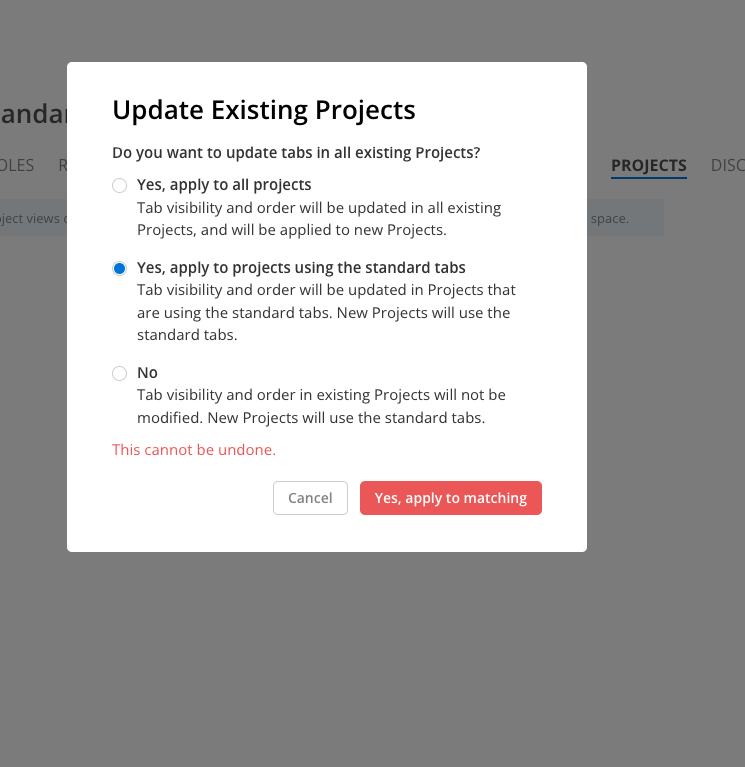
The Update Existing Projects dialog in the Projects settings asks whether to update tabs in existing projects, with the standard-tabs option selected. Visible: Update Existing Projects, Do you want to update tabs in all existing Projects?, Yes, apply to all projects, Yes, apply to projects using the

Did this answer your question?
😞
😐
😁