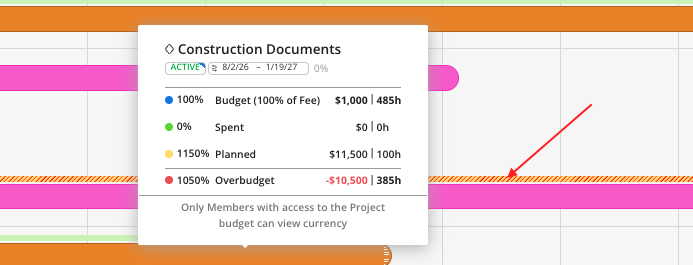
Depending on your Access level (i.e. Admin or Budget Manager); Phase schedules and their associated budget information become visible when hovering over the phase bar on Planner Space.
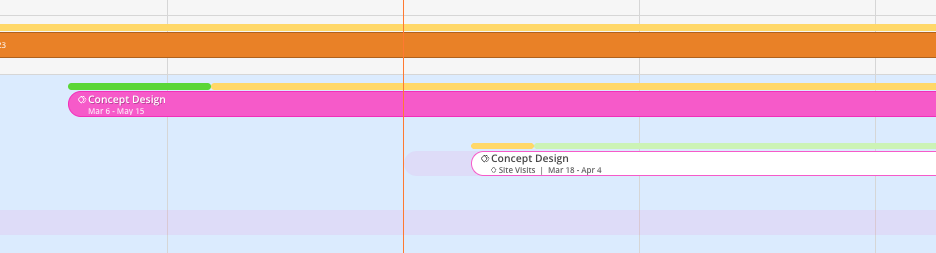
On the top of the phase bar, you can see colorful bars that gives you quick insight on the Budget of that Phase. These colors represent the following:
Light green: Remaining (i.e. Budget minus Spent and minus Planned)
Green: Spent Amount
Yellow: Planned Amount
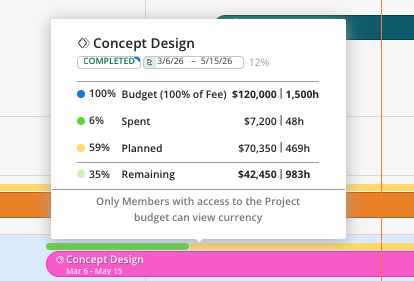
Hover over a phase budget bar to see its financial details, including:
Phase Name
Phase Status
Phase Dates
Phase Dates Completed Percentage
Phase Budget - Currency/ Hours
Spent Time - Currency/ Hours
Planned Time - Currency/ Hours
Remaining Budget - Currency/ Hours

If a phase is over budget, Mosaic will flag it in both the budget widget and on in the budget bar in Red.